Move Your Interactive Flat Panel Where You Need It
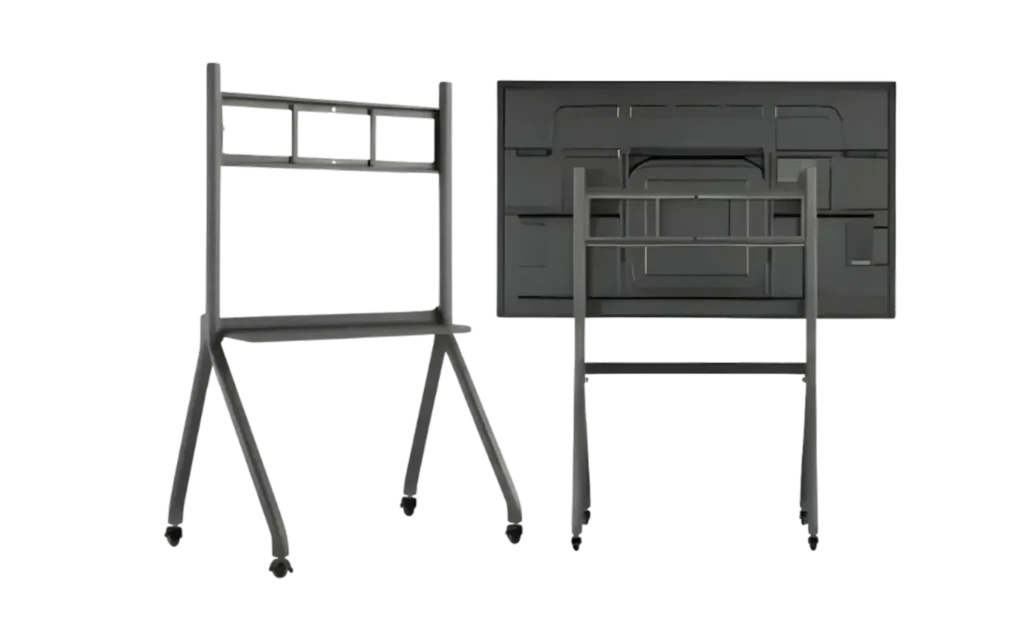
The boardEX trolley stand is a practical solution to move an interactive flat panel between classrooms, meeting rooms, training spaces and other areas. Its mobile design makes it easier to reposition the display when the same panel needs to be used in different spaces.
- Mobile Trolley Design
- Easy Panel Movement
- Stable Support for Interactive Displays
- Suitable for Different Room Setups
- Flexible Height and Positioning
- Suitable for Education and Corporate Use
Clean and Professional Appearance
Comfortable Viewing Position
Flexible Presentation Setup
Suitable for Collaborative Workspaces
Keeps the Display Off the Wall
Supports Different Seating Layouts
Suitable for Multi-Purpose Spaces
Neat Alternative to Fixed Installation
Interactive Panel Trolley Stand Oman
The boardEX trolley stand is for users who need to move an interactive flat panel from one location to another. Instead of keeping the display fixed in one room, the trolley stand allows the panel to be repositioned based on daily requirements.
It is suitable for schools, training centres, offices, conference rooms and other professional spaces where one interactive panel may need to serve multiple areas.
Easy Movement Between Different Spaces
The trolley design makes it easier to move the interactive flat panel when required. This can be useful for schools and organisations that share a display between classrooms, meeting rooms or training areas.
Stable Support for Interactive Panels
A suitable stand should keep the panel securely supported during everyday use. The trolley stand provides a dedicated structure for mounting the interactive flat panel while allowing it to remain mobile when required.
Flexible Room Arrangement
The display can be positioned according to the layout of the room. Move the panel closer to the audience, change its position for a presentation or relocate it to another space without installing a new display.
Useful for Shared Displays
Not every room needs its own interactive flat panel. A mobile trolley stand allows organisations to use one display across multiple spaces, depending on their schedule and requirements.
Suitable for Education and Business
The trolley stand can be used with interactive panels in classrooms, training rooms, boardrooms, conference rooms, workshops and other professional environments.
Easy Access Around the Display
The mobile design can make it easier to position the display where users need it. It also provides a practical setup for presentations, teaching sessions and other activities.
| Camera Type | PTZ Video Conference Camera |
|---|---|
| Video Resolution | Up to 4K UHD* |
| Optical Zoom | Up to 20x* |
| Digital Zoom | Up to 16x* |
| Pan Range | ±170°* |
| Tilt Range | -30° to +90°* |
| Connectivity | USB, HDMI, LAN/PoE* |
| Streaming | RTSP / RTMP / NDI* |
| Control | LAN, RS232 / RS485, Remote Control* |
| Preset Positions | Up to 255 via LAN* |

High-Resolution Video
The boardEX PTZ camera delivers Full HD/4K video for clear and detailed image capture. It helps keep presenters, speakers, participants and other important visual details visible during meetings, online classes, events and live broadcasts. The higher resolution is especially useful when the camera needs to capture details from a distance.
10x / 20x / 30x Optical Zoom
With up to 30x optical zoom, the camera can capture closer views of speakers, presenters and other subjects without relying only on digital enlargement. Different zoom options can be selected based on the size of the room and the required viewing distance. This makes the camera suitable for conference rooms, lecture halls, auditoriums and larger event spaces.
Smooth Pan & Tilt Movement
The camera can move horizontally and vertically to cover different parts of a room or venue. Users can adjust the viewing angle to follow presenters, speakers or participants during a session. This makes a PTZ camera more flexible than a fixed-position camera when one camera needs to cover multiple areas.
Auto Tracking
Auto tracking helps the camera follow a moving presenter or speaker without requiring constant manual control. This is useful for classrooms, training sessions, presentations and live events where the speaker may move around the room. It can also reduce the need for a dedicated camera operator during certain sessions.
Preset Positions
Preset positions allow users to save frequently used camera angles and return to them when needed. For example, one preset can focus on the presenter, another on the audience and another on a specific area of the room. This makes switching between different views quicker during meetings, classes and live events.
Live Streaming Support
PTZ cameras can be used for webinars, online classes, conferences, presentations, events and other live broadcasts. Their remote movement and zoom capabilities allow users to change the camera view without physically moving the equipment. Supported streaming options and protocols may vary by model.
Multiple Control Options
The camera can support different control methods depending on the model and configuration. Users can adjust pan, tilt, zoom and preset positions through supported remote, network or control interfaces. This gives operators greater control when managing cameras during meetings, presentations and live productions.